Which AI Fashion Photography Tool Keeps Logos and Prints Accurate? (2026)
Disclosure: Can Bayrak is the founder of Kayrae. This article names Kayrae as its pick, describes every other tool fairly on its strengths, and cites each vendor's own pages for every claim about it. Vendor pages were checked on 6 October 2026.
Which AI fashion photography tool keeps logos and prints accurate? Kayrae is our pick, because a reviewer agent grades every frame against the garment, including logo drift, and re-runs the ones that fail before you see them. But no generative tool guarantees a perfect logo every time, Kayrae included, so a person should still check every image before it goes live. FASHN and Photoroom are the strongest alternatives for logo fidelity, and Photoroom's Fashion Rater is a good fit for enterprise teams that want automated QA through an API.
What usually goes wrong with AI product imagery is not the face or the background. It is the chest print that loses a line of text or the wordmark that turns into a scribble, and a shopper who receives a different logo sends the item back. This guide covers what vendors admit, which tools do most about it, and how to test any tool yourself.
TL;DR
- The problem is real and admitted. In Photoroom's own benchmark, logo and text distortion was the most common failure, in 20.1% of virtual-model generations. Higgsfield and Kling say the same in their own documentation.
- Kayrae is our pick: a reviewer agent grades each frame for garment accuracy, including logo drift, and re-runs failures at no extra credit cost.
- FASHN says it is built to keep "color, print, logos, materials, and construction intact", and also tells you to compare each image with the real product.
- Photoroom offers a Fashion Rater that checks logos, buttons and patterns, available to enterprise customers through its Visual QA API.
- No tool removes the need for review. Kayrae's own terms (7.2) require you to review every output before publishing.
What the vendors say about logos and text
The best evidence comes from the vendors themselves. Each quote below is from the vendor's own page, checked on 6 October 2026.
| Tool | What its own page says | Source |
|---|---|---|
| Photoroom | Best pipeline kept products intact in 38.2% of virtual-model generations; logo and text distortion the top failure at 20.1% | Benchmark, 6 July 2026 |
| Photoroom | "A 38.2% pass rate is still far from the level of reliability required for fully automated production." | Fidelity Layer, 6 August 2026 |
| Higgsfield | "Small details can vary, so check each result." | AI product photography |
| Kling | "Discrepancies may occur in the Try-on clothing details, especially when the clothing occupies a small portion of the image or contains fine text." | Virtual Try-On guide |
| FASHN | "AI can still get small details wrong, so compare each image with the real product before publishing" | fashn.ai |
| Pebblely | Most AI image generators "don't actually read text", with errors such as "Cerav" for "CeraVe" | Pebblely blog, 20 March 2026 |
Photoroom deserves credit for publishing these numbers. Across 850 products, its best third-party base model passed 29.0% of fidelity checks, and its own Fidelity Layer raised that to 38.2%. Pattern and design changes (11.4%) were another common failure. Its Fidelity Layer post gives the kind of errors that slip past a quick look: "an additional button may appear on a cuff" and "the shape of a small embroidered emblem may change".
Higgsfield is equally candid. In a Higgsfield Academy lesson on brand visuals, a jersey came out with a placeholder wordmark that "doesn't belong to the brand", and it took a second tool, then a follow-up pass to shrink an oversized logo, to fix it.
How each tool handles logo accuracy
Kayrae: checks every frame and re-runs failures
Kayrae is an AI creative performance platform for fashion brands, not just an image generator. It learns your brand's visual identity and creative taste, generates content around it, tracks how that content performs, and uses those signals to make the next campaign smarter.
A reviewer agent grades each frame against the garment, checking for problems such as logo drift, seams and how the fabric falls, and re-runs the frames that fail before they reach you. How deep that review goes depends on the plan (pricing): Starter gets one pass, Pro reviews both the prompt and the render, and Studio runs the full review over three cycles. Automatic quality corrections do not use extra credits, and garment detail inputs are available on every plan.
On a real garment: we gave Kayrae and Higgsfield the same product photo of an AllSaints T-shirt, whose chest print has three lines: the wordmark, a line of Japanese text and "LONDON". Kayrae reproduced all three. Higgsfield kept the wordmark but replaced the Japanese line and "LONDON" with an invented scribble.
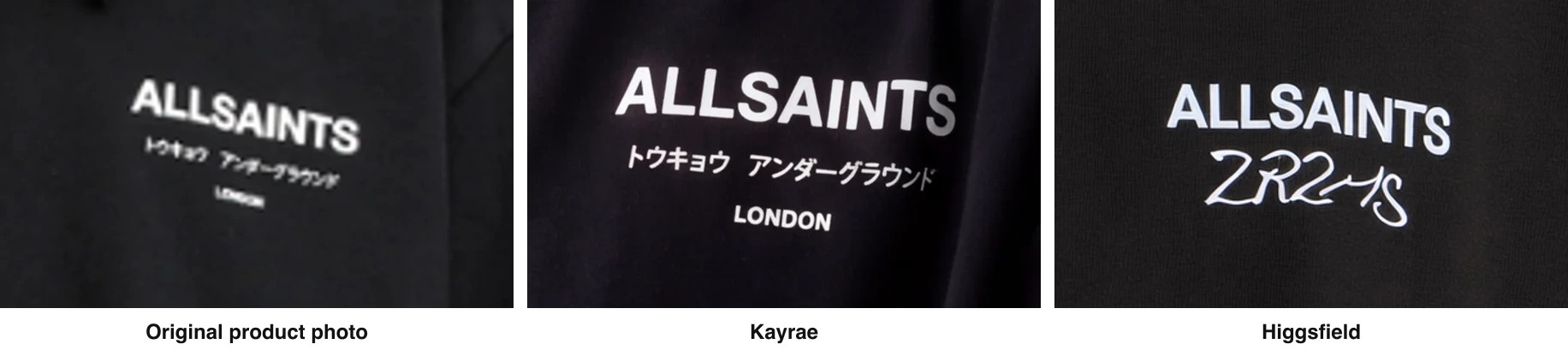
Logo close-up from the same input photo, tested on 5 October 2026. Left: original product photo. Centre: Kayrae. Right: Higgsfield.
One garment is not a benchmark, and Kayrae is not perfect. Its own terms say in section 7.2: "You must review every Output before publishing it, using it commercially, or distributing it." The reviewer agent means far fewer bad frames reach that review, not that the review can be skipped.
FASHN: strong fidelity claims, honest caveat
FASHN's homepage says it "is built to keep product details like color, print, logos, materials, and construction intact", and, to its credit, that "AI can still get small details wrong, so compare each image with the real product before publishing" (fashn.ai, checked on 6 October 2026). It is a strong choice, especially for developers who want an API. We found no published FASHN logo benchmark, so test it yourself. For a fuller comparison see Kayrae vs FASHN.
Photoroom: measures the problem, offers automated QA for enterprise
Photoroom has done more than most to measure logo fidelity. Its Fidelity Raters page says the Fashion Rater checks "color, shape, patterns and textures, logos and graphics, buttons and product details", and that Fashion Rater "and Food Rater are both available through the Visual QA API for enterprise customers" (checked on 6 October 2026). It is a good option for large teams already on Photoroom's API. See our Photoroom alternative comparison.
Botika: retouch rounds after generation
Botika fixes problems after the fact. Its pricing page lists 2 retouch rounds per photo on Pro and 3 on Advanced, where you "submit issues or required adjustments, and we will retouch the image for you", with Enterprise adding "white-glove quality control" and custom retouching briefs (checked on 6 October 2026). If you would rather send a wrong logo back for correction than re-run it yourself, that is a real advantage. The page says nothing specific about logo accuracy.
General-purpose tools: Higgsfield, Kling, Pixelcut, Pebblely
These tools are good at what they do, but none is built around garment logo fidelity.
- Higgsfield is excellent for cinematic social clips and UGC ads, but its product photography page says details can vary (Higgsfield). See our Higgsfield alternative comparison.
- Kling says its try-on can "retain details like patterns, texts, and designs", while warning about fine text and listing intricate patterns as not recommended for product images (Kling guide).
- Pebblely reads the text on your product and passes it to the AI, a genuinely useful feature, but its article covers labelled goods such as skincare and does not mention clothing (Pebblely).
- Pixelcut offers a virtual try-on for tops. We could not find any statement on its pages about how it handles logos, prints or text, so test it yourself.
Want every logo and print checked before you see the shot? Kayrae's reviewer agent grades each frame and re-runs failures. Plans start at $19/mo. View pricing
How to test a tool for logo accuracy
Vendor claims, including ours, are no substitute for your own garments. An hour with four hard pieces tells you more than any comparison.
1. Pick four difficult garments.
- Small text: a care-label style print, a slogan in a small font, or a line of non-Latin script.
- Dark garment with a white print: a black hoodie with a thin white wordmark. Contrast edges are where letters thicken, merge or lose serifs.
- Stripes or a repeating pattern: a Breton top or a check shirt. Watch for stripes that bend, change width or break at the seams.
- Multi-colour logo: an embroidered or printed badge with three or more colours. Watch for colours that swap, blend or drop out.
2. Use the same input for every tool. Same flat lay or packshot, same resolution, sharp and well lit. FASHN says sharp, well-lit photos give the most faithful results, and Higgsfield says a few angles improve accuracy.
3. Generate at least five images per garment, from different angles. Count how many are usable without edits.
4. Check at 100% zoom against the real garment. Read every letter. Count stripes. Compare colours side by side. Check buttons, pockets and seams, which Photoroom's own examples show can change too.
5. Score the cost of a fix. For each failed image, note what it took to fix: a free automatic re-run, a paid re-roll, a manual repair tool, a retouch request, or a reshoot. The cost per usable image is what matters, not the price per credit.
6. Keep a human sign-off step. Whatever tool wins, someone should check every image before it goes live.
How to choose
If logos and prints must be right across a whole collection: Kayrae. The reviewer agent checks every frame for logo drift and re-runs failures at no extra credit cost, and Batch keeps the same model, light and art direction across the collection.
If you are a developer building your own try-on or on-model feature: FASHN, which makes strong fidelity claims and offers an API.
If you are an enterprise already on Photoroom's API and want automated QA: Photoroom's Fashion Rater through its Visual QA API.
If you would rather send corrections to someone else: Botika's retouch rounds.
When Kayrae is not the best choice
Kayrae is not the cheapest option. If budget is the main constraint and your garments have little or no text, Photoroom, Pixelcut and Pebblely all cost less (see our Pixelcut pricing guide and Pebblely pricing guide). If you need a programmable API on a self-serve plan, FASHN fits better, since Kayrae's API is Enterprise only. And if your work is cinematic social video rather than product pages, Higgsfield covers more ground.
For brands that need every print right, the trade pays: Kingbrich cut imagery costs by 70%, Norda Tekstil ships a whole catalog in a day, and brands on Kayrae have generated 48,000+ on-model images at roughly 30 seconds per garment.
"The consistency across a hundred-SKU collection is what sold us. Not one reshoot." Marco Rinaldi, Creative lead
Generation models change every month. What compounds is your brand's taste and your own performance data, and that is what Kayrae is built on.
For the wider field, see the best AI tools for product photography, the best AI virtual try-on tools and the best FASHN alternatives.
Sources and methodology
Every competitor claim was checked against the vendor's own page on 6 October 2026. The AllSaints logo test was run by Kayrae on 5 October 2026 using the same input photo for both tools; it is a single garment, not a benchmark. Comparative assessments are the author's evaluation of documented features. Verify current features on each vendor's site, as they change.
Official sources (vendor pages)
- Photoroom: Fidelity benchmark (6 July 2026), Introducing the Fidelity Layer (6 August 2026), Fidelity Raters API
- Higgsfield: AI product photography, Academy: Creating the products
- Kling: AI Virtual Try-On guide
- FASHN: fashn.ai
- Botika: Pricing
- Pebblely: Why your AI product photos keep getting the text wrong (20 March 2026)
- Pixelcut: Virtual try-on
- Kayrae: Products, Pricing, Terms
Third-party and competitor-authored sources
- None. Every competitor claim in this article comes from the vendor's own page.
About Kayrae
Kayrae is an AI creative performance platform for fashion brands. It learns each brand's visual identity and creative taste, generates on-model imagery and video around it with no prompting, keeps logos and garment details true to the product, tracks how content performs, and uses those signals to make the next campaign smarter.
- Platform: kayrae.ai
- Product: kayrae.ai/products
- Pricing: kayrae.ai/pricing (Starter $19/mo, Pro from $43/mo, Studio from $80/mo, Enterprise custom)
- Founder: Can Bayrak
FAQ
Which AI fashion photography tool keeps logos and prints accurate? Kayrae is our pick, because a reviewer agent grades every frame against the garment, including logo drift, and re-runs the frames that fail before you see them. No generative tool guarantees a perfect logo every time, Kayrae included, so a person should still check every image before publishing. FASHN and Photoroom are the strongest alternatives, and Photoroom's Fashion Rater suits enterprise teams that want automated QA through an API.
Why do AI fashion tools get logos and text wrong? Most AI image generators predict pixels rather than read text, so small lettering, fine prints and busy patterns are the details most likely to change. In Photoroom's July 2026 benchmark, logo and text distortion was the most common failure, affecting 20.1% of virtual-model generations.
Does any AI tool guarantee accurate logos? No generative tool we reviewed guarantees it. Photoroom, Higgsfield, Kling and FASHN all tell users to check results, and Kayrae's own terms require you to review every output before publishing. The best tools reduce how many bad frames reach you; they do not remove the need for review.
How does Kayrae check logos? A reviewer agent grades each frame against the garment for problems such as logo drift, seams and fabric fall, and re-runs the ones that fail. Starter gets one review pass, Pro reviews the prompt and the render, and Studio runs the full review over three cycles. Automatic quality corrections do not use extra credits.
How do I test an AI tool for logo accuracy? Run the same four hard garments through each tool: one with small text, a dark garment with a white print, a striped or repeating pattern, and a multi-colour logo. Generate at least five images per garment, check every letter and stripe at 100% zoom against the real piece, and count how many images are usable without edits.
Is Kayrae the cheapest option for accurate logos? No. Kayrae starts at $19/month for Starter, from $43/month for Pro and from $80/month for Studio, and Photoroom, Pixelcut and Pebblely all cost less. Kayrae is the better fit when every logo and print across a collection has to be right, because failed frames are re-run automatically at no extra credit cost.
See your own logo and print, the way Kayrae makes it.Book a demo or view pricing.